Replying to reviews is one of those tasks that seems small until you’re managing several locations at once.
We know we’ve never been advocates of automation, but with Cintia, our AI review-reply agent that learns your tone, the rules change.
Cintia can suggest replies for you to check before publishing them, and from now on, it can reply completely automatically following the rules you set. Let’s go through how the automation works step by step, so you can configure it around your business needs.
Two levels of automation
The first thing to understand is that Cintia offers two independent working modes, each with its own toggle:
Suggest replies automatically. With this option enabled, Cintia drafts a proposed reply every time a new review comes in, but doesn’t publish it for you. The suggestion sits in your inbox waiting for you to review it, edit it if needed and send it yourself. It’s the safest option if you want to keep full control over what’s said on behalf of your brand.
Reply to reviews automatically. This is the next level: Cintia not only drafts the reply, it publishes it without human intervention, following exactly the criteria you’ve configured. It’s designed for businesses with a high volume of reviews, where going through them one by one isn’t viable, or for applying scheduled replies to the most routine cases (thanking someone for a 5-star review, for example) and saving your time for the cases that really do need a personal touch (human intervention).
The two options can coexist: you can let Cintia reply on its own to the simplest reviews (5 stars with no comment) and only suggest replies for the rest.
Deciding which reviews get answered automatically
Full automation doesn’t have to be all or nothing. Cintia lets you filter which reviews fall under automatic replies based on two criteria:
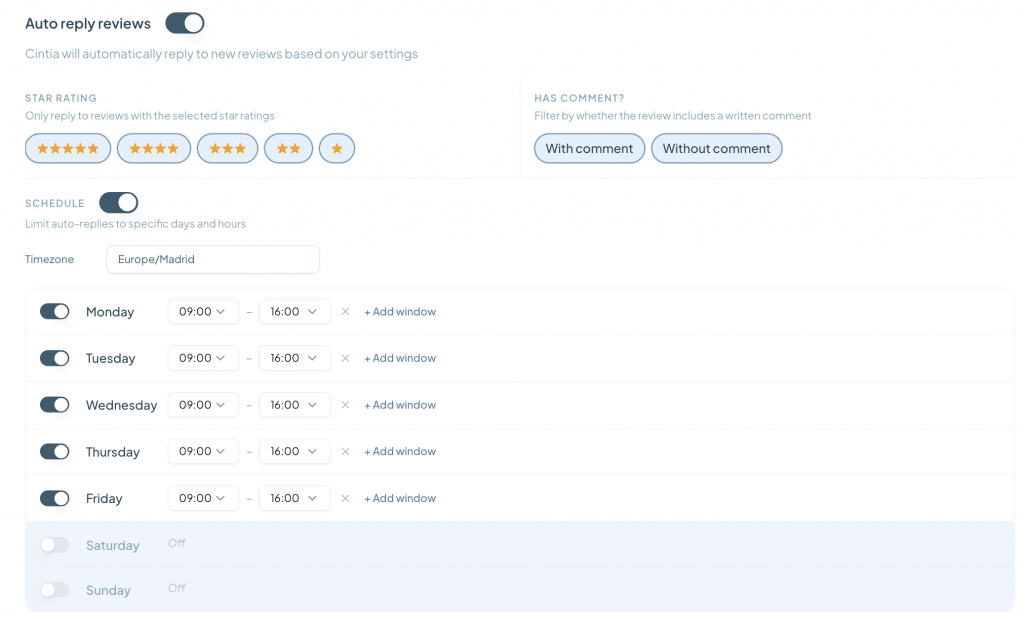
- Star rating. You can choose exactly which ratings Cintia replies to automatically (5, 4, 3, 2 or 1 stars, in any combination). A common approach is to automate 4- and 5-star reviews, where a standard thank-you reply works well, and leave 1- and 2-star reviews out of the automation so you can handle them personally or, at the very least, run them through suggestion mode.
- Whether the review has a comment or not. You can also filter based on whether the customer left just a rating or also wrote a comment. This is useful because a review with no text usually calls for a generic thank-you, while a review with a comment tends to deserve a reply that refers to what the person actually said.
By combining both filters you can build fairly precise rules, such as “reply automatically only to 4- and 5-star reviews with no comment” and leave everything else for manual review or suggestions.
Schedule and time zone control
Another key part of the setup is scheduling. By enabling the schedule option, you can limit automatic replies to specific days and time slots, and the system lets you define the reference time zone.
This makes sense for two reasons. First, an automatic reply published at 3 in the morning can come across as less natural than one that arrives during business hours (both for the customer and for Google). Second, many businesses prefer automatic replies to line up with the hours when the team could step in if something needs attention, even if in practice they don’t.
You can configure each day of the week independently, turning the automation on or off day by day and defining one or several time slots per day (with the option to add more slots if you need them). For example, a typical Monday-to-Friday setup from 9:00 to 16:00, leaving Saturday and Sunday inactive, keeps automatic replies within working hours and means weekend reviews wait until Monday or are handled another way.
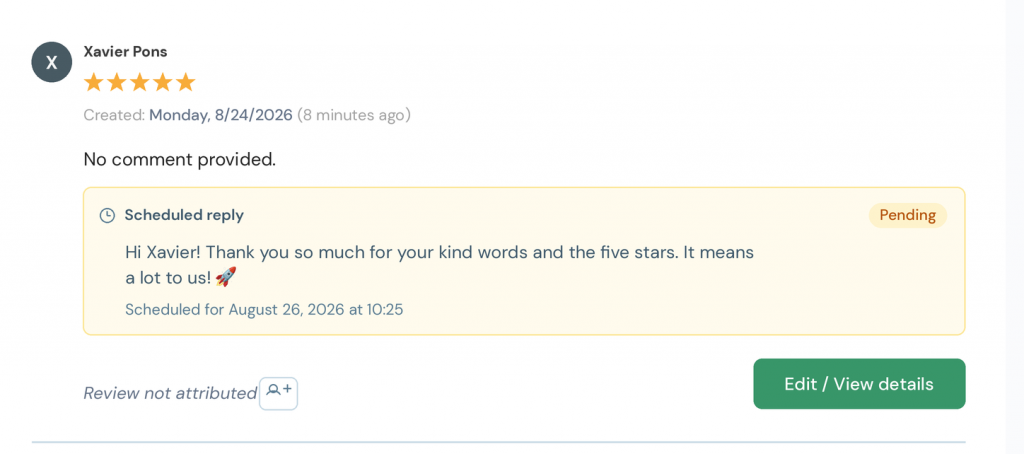
One important detail is that, even in fully automatic mode, Cintia doesn’t publish the reply the moment the review arrives: it drafts it and schedules it for a specific time within the allowed slot. For example, a 5-star review with no comment that comes in on a Monday morning may generate a reply that is marked as “Pending” and scheduled to publish a couple of days later, mid-morning, instead of going out immediately. While the reply is pending, it stays visible and editable from the review itself (via the “Edit / View detail” option), so you keep one last chance to check or change it before it goes live.
Brand-level and location-level settings
If you manage several locations under one brand, Cintia’s configuration is organised on two levels. There’s a general brand-level configuration (for all Cinquo locations, for example) that acts as the default, and that configuration can be overridden at individual location level when a specific store or venue needs different rules. This is especially useful if, say, one location gets a much higher volume of reviews than the rest, or has different opening hours.
Cintia credits
Every reply Cintia generates, whether as a suggestion or as a published automatic reply, uses Cintia credits from your balance. The settings panel always shows your available balance, and you can get more credits right from there whenever you need them. This means that before enabling automatic replies across many locations or for a high volume of reviews, it’s worth checking how many credits you have available and how many reviews you usually receive over a given period, so you don’t run out of balance just when you need it most.
With annual plans you get unlimited replies for as long as the subscription is active.
Where to start
If you’ve never been into Cinquo, here’s the link to the web version:
From your profile icon, go to settings and “AI Configuration”.
If you’ve never used review automation before, a safe way to start is to enable only automatic suggestions for a few weeks. That lets you see the kind of replies Cintia generates and adjust the tone if needed using custom instructions, with no risk of anything being published that you wouldn’t have checked yourself. Once you trust the quality of the suggestions, you can turn on automatic replies starting with a conservative filter (only 5-star reviews, for instance) and widen it gradually as you see the results.
With this combination of suggestions, automatic replies, rating and comment filters, and schedule control, Cintia is built so that you decide exactly how much control you hand over in each situation, instead of forcing you to choose between doing everything by hand and automating it all at once.


One Response