If you’re having trouble getting new reviews to update on your Google Business Profile (GBP) and appear in the Cinquo app, it may be due to a permission not being granted correctly.
Below, we detail the steps you need to follow to revoke access permissions and correctly link the app, ensuring that new reviews are synchronized and appear immediately on your profile.
Step 1: Log in to Google
- Open Google Chrome in your browser.
- Select the user or email address you used to log in to the Cinquo app.
Step 2: Remove Cinquo permission
- Go to the Google Account page: https://myaccount.google.com/connections.
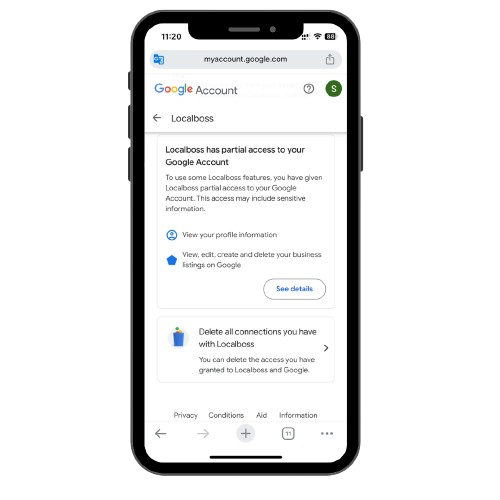
- Search for the Cinquo app in the list of apps with access to your Google account.
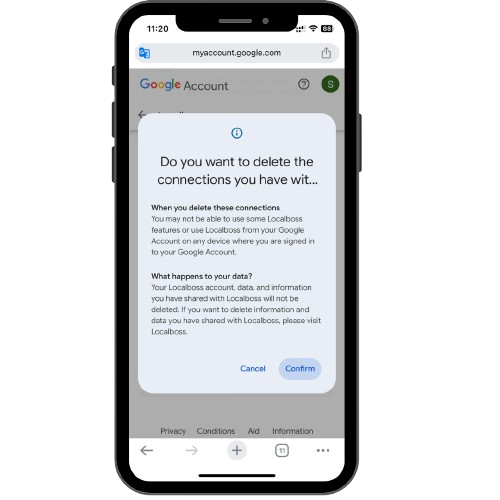
- Click on Cinquo and select “Remove all connections you have with Cinquo.”
Step 3: Log out and reactivate the account
- Open the Cinquo app on your device.
- Go to the menu at the bottom right and select Log out.
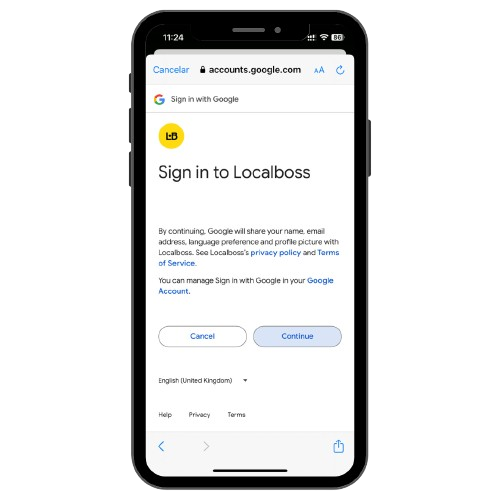
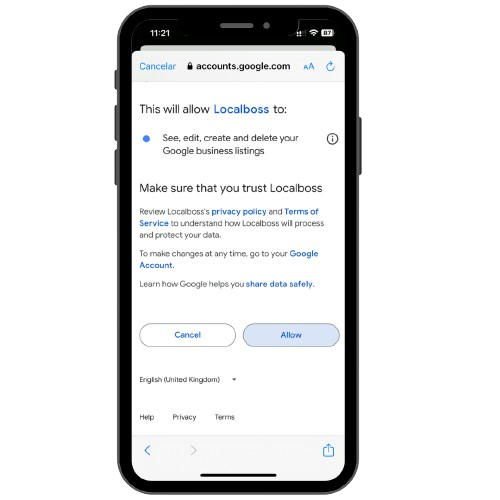
- Log back into the Cinquo app and make sure to accept all the permissions it requests.
Once you have completed these three steps, Cinquo will be correctly linked to your Google Business Profile account, and new reviews will start updating properly in the app.

